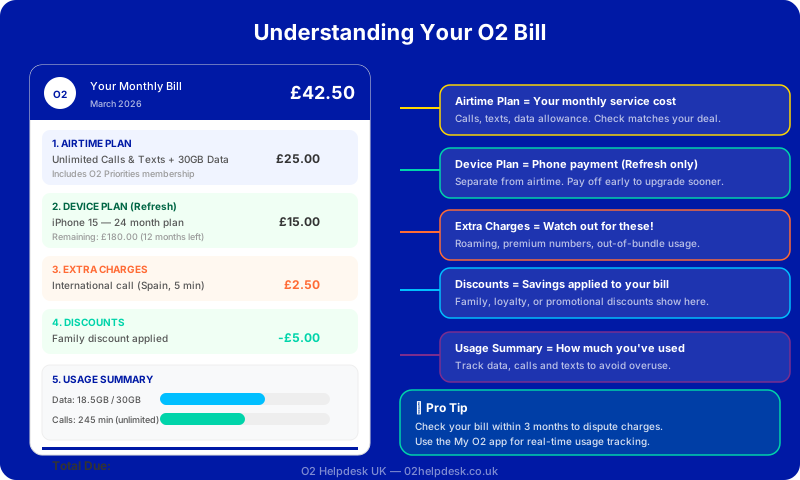
Your O2 bill arrives every month, but do you really understand what you're paying for? For many customers, the answer is no—and that's not your fault. O2 bills can be confusing, with multiple sections, technical terms, and charges that aren't always clearly explained.
In this comprehensive guide, we'll break down every section of your O2 bill so you know exactly what you're paying for and can spot any errors or unexpected charges.
Breaking Down Your O2 Bill
Your monthly O2 statement typically contains several key sections. Let's examine each one:
1. Account Summary
This is the first section you'll see and provides a high-level overview:
- Total Amount Due: The full amount you need to pay
- Billing Period: The dates covered by this bill
- Account Number: Your unique O2 account reference
- Payment Due Date: When payment must be received
2. Airtime Plan
This section shows the cost of your service package:
- Monthly cost for calls, texts, and data allowance
- Any inclusive allowances (minutes, texts, data)
- Any discounts applied to your plan
3. Device Plan (O2 Refresh Only)
If you're on O2 Refresh, this shows your handset payments:
- Monthly cost for your device
- Remaining balance on your device
- Contract end date for the device plan
4. Add-ons & Extras
This section lists any additional services:
- Insurance (O2 Insure)
- Additional data packs
- International calling packages
- O2 Extras (like Disney+, Amazon Prime)
5. Out-of-Plan Charges
This is where unexpected charges often appear:
- Data overage charges
- Calls to premium rate numbers
- International calls and texts
- Roaming charges
6. One-off Charges
These are irregular charges that don't appear every month:
- Early upgrade fees
- Late payment charges
- Device repair costs
- Administration fees
Common Billing Issues to Watch For
1. Missing Discounts
Were you promised a discount when you signed up? Make sure it's actually applied to your bill. Common missing discounts include:
- Student discounts
- NHS or key worker discounts
- Retention discounts (offered when threatening to leave)
- Promotional offers
2. Continued Device Plan Charges
On O2 Refresh, your Device Plan should end automatically when you've paid off your handset. However, some customers report continued charges. Check this section carefully if your contract term has ended.
3. Unexpected Add-ons
Sometimes services are added without clear consent. Review the Add-ons section each month to ensure you're only paying for services you actually want.
How to Access Your O2 Bill
Via the My O2 App
- Open the My O2 app on your smartphone
- Log in with your O2 account credentials
- Tap on "Bills" or "Billing"
- View your current bill or browse previous bills
Via the O2 Website
- Visit o2.co.uk and sign in
- Go to "My Account" or "My O2"
- Select "Bills" from the menu
- Download or view your bill online
Paper Bills
If you receive paper bills, they follow the same format as online bills. Consider switching to online billing for easier tracking and environmental benefits. If you believe you are being overcharged, Ofcom provides guidance on your rights as a mobile customer.
Understanding Your Data Usage
Your bill will show how much data you've used during the billing period. Understanding this can help you avoid overage charges:
| Activity | Approximate Data Used |
|---|---|
| 1 hour of streaming music | 50-100 MB |
| 1 hour of SD video streaming | 700 MB - 1 GB |
| 1 hour of HD video streaming | 2-3 GB |
| 1 hour of video calling | 200-500 MB |
| Social media browsing (1 hour) | 100-200 MB |
Need Help Understanding Your Bill?
Our O2 billing specialists can analyse your bill line by line and identify any errors or opportunities to save money.