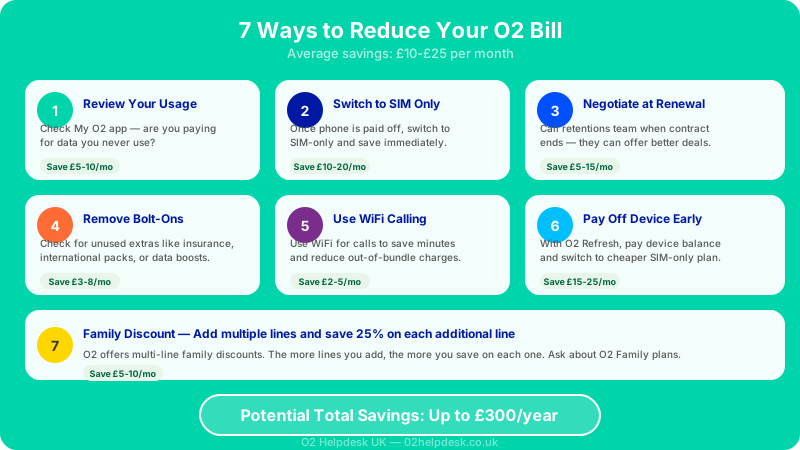
If you feel like your O2 bill is creeping up month after month, you are not alone. Many O2 customers in the UK pay more than they need to simply because they haven't reviewed their plan in a while or aren't aware of the options available to them. The good news is that there are concrete, practical steps you can take right now to reduce your O2 bill without sacrificing the service you rely on.
In this guide, we walk through ten proven strategies that real O2 customers use to lower their monthly costs. Whether you are on a pay monthly contract, a SIM-only deal, or an O2 Refresh plan, at least some of these tips will apply to your situation. If you want to understand what each charge on your bill actually means before you start cutting costs, our complete guide to understanding your O2 bill is a helpful companion to this article.
1. Review Your Current Tariff
The single most impactful thing you can do to reduce your O2 bill is to review the tariff you are currently on and compare it to what you actually use each month. Many customers sign up for a plan with a generous data allowance, unlimited minutes, and unlimited texts, only to discover months later that they barely use half of what they are paying for.
How to Check Your Usage
Log in to the My O2 app or visit your account on the O2 website. Navigate to the usage section, where you can see a breakdown of how many minutes, texts, and gigabytes of data you have used during the current billing cycle and in previous months. Look at three to six months of usage data to get an accurate picture, since one unusually high or low month can be misleading.
Pay particular attention to data usage. If you are consistently using only 5 GB of data but paying for a plan that includes 30 GB, you are almost certainly overpaying. O2 offers a range of plans at different price points, and dropping to a lower data tier could save you several pounds every month. Over the course of a year, those savings add up significantly.
What to Look For
- Data allowance vs. actual usage: Are you regularly using less than half your allowance?
- Minutes usage: Do you actually make enough traditional calls to justify an unlimited minutes plan?
- Texts: With most people using WhatsApp and iMessage, paid text allowances are often unnecessary.
- Add-ons: Are you paying for bolt-ons like extra data packs or international calling bundles that you no longer need?
Once you have a clear picture of your usage patterns, contact O2 or use the My O2 app to explore alternative tariffs that better match your needs. Even a small adjustment can result in meaningful savings.
2. Switch to a SIM-Only Deal
If your phone contract has ended but you haven't switched to a SIM-only plan, there is a strong chance you are paying far more than you need to. When you take out a pay monthly contract that includes a handset, a significant portion of your monthly payment goes towards paying off the cost of the device. Once that device is fully paid off, you should not still be paying the same amount.
On O2 Refresh contracts, your plan is split into an Airtime Plan and a Device Plan. The Device Plan ends automatically once the phone is paid off, which means your bill should drop. However, if you are on an older-style contract where the device cost was bundled into the monthly price, you may continue paying the full amount even after the device subsidy period is over.
The SIM-Only Advantage
SIM-only deals from O2 typically cost considerably less than equivalent plans that include a handset. You keep your existing phone, pop in a new SIM (or keep your current one), and pay only for the airtime you use. SIM-only contracts are also more flexible, with options available on 1-month, 12-month, or 24-month terms.
To find out whether you are still in contract, check your contract end date in the My O2 app or read our guide on checking your O2 upgrade eligibility. If your contract has ended, switching to SIM-only is one of the fastest ways to reduce your O2 bill.
3. Use WiFi Calling to Reduce Minutes Usage
WiFi calling is a feature available on most modern smartphones that allows you to make and receive calls over a WiFi connection rather than using the mobile network. The benefit is twofold: call quality is often better, especially in areas with poor mobile signal, and the calls use your WiFi connection rather than your mobile minutes.
How WiFi Calling Helps You Save
If you spend a lot of time at home or in an office with a WiFi connection, enabling WiFi calling means that many of your calls will go through your broadband connection rather than the O2 network. This can be especially valuable if you are on a plan with a limited number of minutes and frequently incur overage charges.
Even if your plan includes unlimited minutes, using WiFi calling can still be beneficial. It may allow you to comfortably downgrade to a cheaper plan with fewer included minutes, knowing that most of your calls will be handled over WiFi anyway.
How to Enable WiFi Calling on O2
On an iPhone, go to Settings, then Phone, then WiFi Calling, and toggle the feature on. On Android devices, the setting is usually found under Settings, then Connections or Network, then WiFi Calling. You may need to ensure your device is compatible and that the feature is supported on your specific O2 plan. O2 supports WiFi calling on a wide range of handsets, and there is no extra charge to use it.
4. Check for Hidden Charges on Your Bill
One of the most common reasons people pay more than expected on their O2 bill is hidden or unexpected charges. These are not necessarily hidden in a deceptive sense, but they can be easy to miss if you don't scrutinise your bill carefully each month.
Common Hidden Charges to Look For
- Premium rate numbers: Calls to numbers starting with 09, 084, or 087 are often charged at significantly higher rates than standard calls. A single call to a premium number can add several pounds to your bill.
- Directory enquiry services: Calling 118 numbers can be extremely expensive, sometimes costing several pounds per minute.
- Third-party charges: These appear when you unknowingly subscribe to a third-party service via your phone, such as ringtones, competitions, or content subscriptions billed through your O2 account.
- Data overage: If you exceed your monthly data allowance, O2 may charge you for additional data or automatically add a paid data bolt-on.
Go through your bill line by line at least once every few months. If you spot charges you don't recognise or didn't authorise, you may be able to dispute them. Our guide on how to dispute an O2 billing charge explains the process step by step.
5. Negotiate with the O2 Retention Team
This is one of the most effective ways to reduce your O2 bill, yet many customers never try it. When you tell O2 that you are thinking of leaving, your call is typically transferred to the retention team (sometimes called the "disconnections" or "loyalty" team). This team has access to exclusive deals and discounts that are not available through the standard customer service channels or the O2 website.
How to Approach the Negotiation
Before you call, do your homework. Check what comparable deals are available from other networks like Three, EE, and Vodafone. Having specific competing offers in mind gives you leverage when negotiating. You don't need to be aggressive or confrontational; simply be polite and clear about the fact that you've seen better deals elsewhere and are considering switching.
The retention team is measured on how many customers they keep, so they are motivated to offer you a better deal. Common offers from the retention team include:
- A lower monthly price on the same tariff
- Extra data, minutes, or texts at no additional cost
- A one-off bill credit
- A discounted upgrade to a better plan
- Free add-ons for a set period (such as an entertainment subscription)
When to Call
The best time to negotiate is when your contract is ending or has already ended. At this point, you are free to leave without any early termination charges, which gives you genuine leverage. However, even if you are mid-contract, it is worth calling if your bill has increased due to an annual price rise, as you may have the right to leave penalty-free within 30 days of the increase taking effect.
6. Set Up an O2 Spending Cap
An O2 spending cap is a free tool that lets you set a maximum limit on out-of-plan charges. This means that if you accidentally go over your data allowance, make calls to premium numbers, or use your phone abroad, the charges will be capped at the limit you set rather than spiralling out of control.
How the Spending Cap Works
You can set your spending cap to any amount you choose, starting from zero. Setting it to zero means you will not be able to make any out-of-plan calls or use any out-of-plan data, which effectively prevents any surprise charges on your bill. Many customers set the cap at a small amount, such as five or ten pounds, to allow for occasional flexibility while still preventing large unexpected charges.
How to Set Your Spending Cap
- Log in to the My O2 app or visit your account on the O2 website.
- Navigate to the account settings or billing section.
- Look for the spending cap or usage cap option.
- Set your preferred cap amount and confirm the change.
This is particularly useful if you have children on your O2 family plan, as it prevents them from running up large bills through app purchases, premium content, or excessive data use.
7. Disable Premium Services and Third-Party Billing
Third-party services billed through your O2 account are one of the most common sources of unexpected charges. These services include subscription content like horoscopes, gaming services, wallpaper downloads, and competition entries that charge a recurring fee to your mobile bill.
How Third-Party Charges Happen
You might subscribe to a third-party service by accidentally tapping an advert on a website, responding to a text message, or entering your phone number on a website without realising it would sign you up for a paid service. In some cases, customers report being subscribed to services they never knowingly signed up for.
How to Stop Third-Party Charges
O2 allows you to block all third-party charges on your account. You can do this by contacting O2 customer service and asking them to apply a "bar" on premium rate and third-party services. Once this bar is in place, no third-party service will be able to charge your O2 account.
If you have already been charged for a third-party service you didn't authorise, you should contact O2 to request a refund. You can also contact the Phone-paid Services Authority (PSA), the UK regulator for phone-paid services, to lodge a complaint.
8. Review and Reduce Roaming Charges
Roaming charges can turn an otherwise reasonable O2 bill into a shockingly expensive one. While O2 has made roaming more affordable in recent years, using your phone abroad can still add significant costs to your monthly bill if you are not careful.
Understanding O2 Roaming Zones
O2 divides the world into different roaming zones, each with different pricing. Since the UK left the EU, O2 has introduced charges for using your phone in European destinations under certain plans. The specifics depend on when you took out your contract and which plan you are on, so it is essential to check the details before you travel.
How to Minimise Roaming Costs
- Turn off data roaming: Before you travel, go into your phone settings and disable mobile data roaming. This prevents your phone from using mobile data abroad, which is the most expensive form of roaming.
- Use WiFi wherever possible: Connect to hotel, restaurant, and airport WiFi networks to use data-heavy apps without incurring roaming charges.
- Buy a travel bolt-on: O2 offers daily or weekly roaming passes that give you a set allowance of data, calls, and texts for a fixed fee. These are typically much cheaper than pay-as-you-go roaming rates.
- Consider a local SIM: For longer trips, buying a local SIM card in your destination country is often the cheapest option.
- Download content before you go: Download maps, music, and videos to your phone over WiFi before travelling to reduce the need for mobile data abroad.
For a more detailed breakdown of O2's roaming policies and how to manage your costs while travelling, see our complete O2 roaming guide.
9. Consider an O2 Refresh Early Payoff
If you are on an O2 Refresh contract, your monthly bill is split into two parts: the Airtime Plan (your calls, texts, and data) and the Device Plan (paying off the cost of your handset). One option that many customers overlook is paying off the remaining balance on the Device Plan early.
Why Early Payoff Can Save You Money
Once you pay off the Device Plan, that portion of your monthly bill disappears entirely. If you have the funds available to clear the remaining balance in one lump sum, your monthly bill will immediately drop to just the Airtime Plan cost. Depending on how much of the device you still have left to pay off, this could save you a substantial amount over the remaining months of your contract.
For example, if your Device Plan costs fifteen pounds per month and you have ten months remaining, paying off the remaining one hundred and fifty pounds in one go means you will save fifteen pounds per month for the next ten months. You could then also choose to switch to a cheaper SIM-only Airtime Plan if your current one is more than you need.
How to Check Your Remaining Device Plan Balance
- Open the My O2 app or log in to your O2 account online.
- Go to the Device Plan section of your account.
- View your remaining balance and the option to pay it off early.
There is no penalty for paying off your O2 Refresh Device Plan early. Once cleared, you own the handset outright and are free to keep it, sell it, or give it away. To understand how O2 Refresh contracts work in more detail, read our O2 Refresh explained guide.
10. Check if You Are Out of Contract
This final tip is simple but surprisingly important. Many O2 customers continue paying the same monthly amount long after their minimum contract term has ended, unaware that they are free to switch to a cheaper deal, move to SIM-only, or negotiate a better price.
Why Being Out of Contract Matters
When your contract ends, you are no longer tied to O2. This puts you in a strong negotiating position because O2 knows you could leave at any time with just 30 days' notice. Customers who are out of contract have the most leverage when calling the retention team, and they also have the freedom to shop around for the best deal on the market.
How to Check Your Contract Status
You can check your contract end date in the My O2 app under account details, or by calling O2 customer services. O2 is also required to send you an end-of-contract notification before your minimum term expires, which will include details of what you are currently paying and what alternative deals are available.
If you are out of contract and haven't taken any action, now is the time. At the very least, you should call O2 and ask what deals they can offer you as an existing customer. You might be surprised at how much you can save.
Putting It All Together: A Step-by-Step Action Plan
Rather than trying to implement all ten tips at once, here is a practical order of priority that will give you the quickest wins first:
- Check your contract status: Find out if you are still in contract or free to make changes.
- Review your usage: Log in to My O2 and look at three to six months of call, text, and data usage.
- Scan your bill for hidden charges: Download your itemised bill and look for premium numbers, third-party services, and data overage fees.
- Set a spending cap: This takes two minutes and immediately prevents future surprise charges.
- Block third-party billing: Ask O2 to bar premium services from your account.
- Enable WiFi calling: A quick settings change that can reduce your minutes consumption.
- Consider switching to SIM-only: If your device is paid off, this is usually the single biggest saving.
- Call the retention team: Armed with competitor quotes, negotiate a better deal.
- Review roaming settings: Especially important if you travel regularly.
- Evaluate an early device payoff: If the maths works out, clear your device plan and drop to a cheaper monthly payment.
How Much Could You Save?
The amount you can save depends entirely on your current plan and usage. Customers who are significantly overpaying for data they don't use or who are still on an old contract that includes a device they've already paid off can often reduce their bill by a meaningful amount each month. Even smaller adjustments, like removing an unused add-on or setting a spending cap to prevent overage charges, contribute to savings over time.
The key is to be proactive. Your mobile bill is a recurring monthly expense, which means that any reduction you achieve today will continue saving you money every single month going forward. A saving of just ten pounds per month adds up to one hundred and twenty pounds over the course of a year.
Frequently Asked Questions
Can I reduce my O2 bill without changing my plan?
Yes. Setting a spending cap, blocking third-party services, enabling WiFi calling, and reviewing your bill for hidden charges can all reduce your costs without requiring a plan change. These measures primarily prevent unnecessary extra charges from appearing on your bill.
Will O2 let me downgrade my plan mid-contract?
Generally, O2 does not allow you to downgrade to a cheaper plan during your minimum contract term. However, you can usually remove paid add-ons and bolt-ons at any time. If your bill has increased due to an annual price rise, you may have the right to exit your contract within 30 days without paying an early termination fee, as outlined by Ofcom.
Is it worth paying off my O2 Refresh device early?
It depends on the remaining balance and how many months are left on your device plan. If you have a substantial balance remaining and only a few months left, it may be better to wait. However, if you have many months remaining and can afford the lump sum, early payoff will immediately reduce your monthly bill and give you the flexibility to switch to a cheaper airtime plan.
How do I know if I am being charged for third-party services?
Third-party charges appear in the "Charges from other providers" or "Premium services" section of your itemised bill. You can download your full itemised bill from the My O2 app. If you see charges from companies you don't recognise, contact O2 to query and block them.
Want Help Reducing Your O2 Bill?
Our independent advisors can review your current plan and recommend ways to save money on your O2 mobile costs.