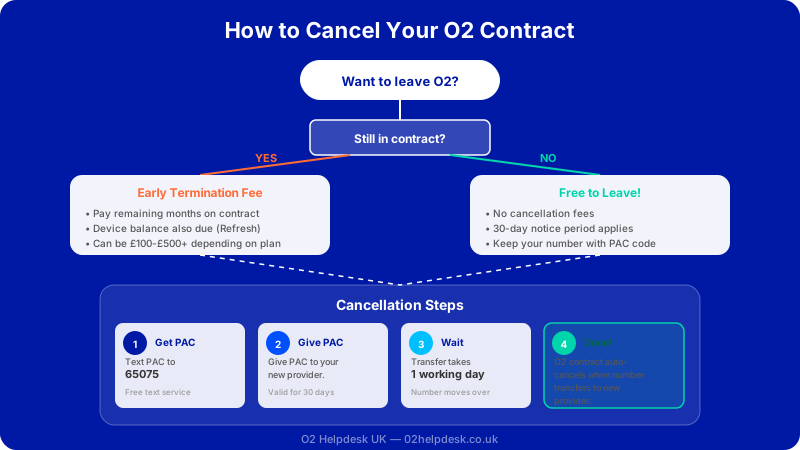
Whether you have found a better deal elsewhere, you are unhappy with O2's service, or your circumstances have simply changed, there are many reasons you might want to cancel your O2 contract. The process is not always straightforward, and getting it wrong can leave you paying more than you need to or losing your phone number entirely.
This guide walks you through everything you need to know about cancelling your O2 mobile contract, from understanding your rights to navigating early termination fees and keeping your number. We cover pay monthly contracts, O2 Refresh plans, and SIM-only deals so you can make the right decision for your situation.
When Can You Cancel Your O2 Contract?
Your options for cancelling depend on where you are in your contract term. There are several scenarios to consider, and each one comes with different implications for what you will pay and how the process works.
During the Cooling-Off Period
Under UK consumer law, you have a 14-day cooling-off period from the date your contract starts or from the date you receive your device, whichever is later. During this window, you can cancel your O2 contract without paying any early termination fees. You will need to return any device you received in its original condition, and O2 may charge you for any services you have already used during those 14 days, such as calls, texts, or data.
This cooling-off period applies to contracts taken out online, over the phone, or in-store. It is a legal right under the Consumer Contracts Regulations 2013, and O2 cannot refuse to honour it. If you are within this period and want to cancel, act quickly and contact O2 as soon as possible.
After the Minimum Contract Term Ends
Most O2 contracts run for 12, 24, or 36 months. Once your minimum term has ended, your contract typically rolls over onto a 30-day rolling basis. At this point, you can cancel at any time by giving 30 days' notice, and you will not face any early termination charges.
Many customers do not realise their minimum term has ended and continue paying the same monthly rate. If you are out of contract, it is worth reviewing whether you are on the best deal. You can check your contract status through the My O2 app or by logging into your account on the O2 website. For more information on checking your contract dates, see our guide on O2 upgrade eligibility.
During the Minimum Contract Term
If you are still within your minimum contract period, you can still cancel, but you will likely have to pay an early termination fee. This is where things can get expensive, so it is important to understand exactly what you will owe before making your decision.
Understanding Early Termination Fees
Early termination fees (sometimes called early exit charges) are the charges O2 applies when you cancel before your minimum contract term has ended. These fees are designed to cover the remaining cost of your contract and, in some cases, any outstanding device payments.
How Early Termination Fees Are Calculated
O2 calculates your early termination fee based on the remaining months of your contract. The fee typically includes your remaining monthly charges minus a discount, as O2 is required to reduce the amount to reflect costs they will no longer incur (such as providing you with network service). In practice, this means you will pay a portion of your remaining monthly bills rather than the full amount.
For example, if you have 10 months left on your contract at a monthly cost of a certain amount, O2 will calculate the termination fee as a percentage of the total remaining payments. The exact percentage can vary, so it is always worth asking O2 for a precise figure before you commit to cancelling.
O2 Refresh and Early Termination
If you are on an O2 Refresh contract, your plan is split into two parts: an Airtime Plan (for calls, texts, and data) and a Device Plan (for your handset). When you cancel early, you will need to pay off the remaining balance on your Device Plan in full, plus any early termination charges on your Airtime Plan.
The Device Plan balance is simply the remaining cost of your phone. There is no discount applied to this portion because it represents the actual cost of the hardware you received. You can check your remaining Device Plan balance at any time through the My O2 app or on your latest bill. If you need help understanding these charges, our guide to understanding your O2 bill breaks down each section in detail.
Mid-Contract Price Increases
O2, like other UK networks, may increase your monthly bill during your contract. These increases are typically linked to inflation rates such as CPI or RPI. Since April 2024, Ofcom rules state that if a provider raises your price by more than the rate published in your contract terms, you have the right to leave without paying an early termination fee. If O2 notifies you of a price increase, read the details carefully and check whether the increase matches the terms you originally agreed to. If it exceeds those terms, you have a window (usually 30 days from the notification) to cancel penalty-free.
PAC Codes vs STAC Codes: Keeping or Losing Your Number
When you leave O2, one of the most important decisions is whether to keep your existing phone number. This is where PAC codes and STAC codes come in, and it is essential to understand the difference.
What Is a PAC Code?
A PAC (Porting Authorisation Code) is a nine-character code that allows you to transfer your existing O2 phone number to a new network. If you want to keep your number when you move to another provider, you will need a PAC code.
Under Ofcom regulations, O2 must provide your PAC code when you request it. They are required to give it to you within one working day, and the code is valid for 30 days. Once you give the PAC code to your new provider, they will handle the transfer. The porting process typically completes within one working day, though there may be a brief period where your service is interrupted during the switch.
Requesting a PAC code effectively starts the cancellation process with O2. You do not need to contact O2 separately to cancel; once your number is ported to the new network, your O2 contract is terminated automatically. However, any early termination charges will still apply and will appear on your final bill.
What Is a STAC Code?
A STAC (Service Termination Authorisation Code) works similarly to a PAC code but is used when you want to cancel your O2 contract without keeping your phone number. If you do not need to port your number, perhaps because you are getting a new number with your new provider or you are simply cancelling without switching, a STAC code is the way to go.
Like PAC codes, O2 must provide your STAC code within one working day, and it is valid for 30 days. Once you provide the STAC code to your new provider (or simply let O2 know you want to proceed), the cancellation will take effect.
How to Request a PAC or STAC Code from O2
There are several ways to request your code from O2:
- By text message: Send the word PAC (or STAC) to 65075 from your O2 handset. O2 must respond with your code within one minute during normal hours.
- Online: Log into your My O2 account and navigate to the account settings or cancellation section.
- By phone: Call O2 customer services on 202 from your O2 phone or 0344 809 0202 from any other phone.
Step-by-Step Process to Cancel Your O2 Contract
Here is a clear step-by-step process for cancelling your O2 contract, whether you are keeping your number or not.
Step 1: Check Your Contract Status
Before doing anything else, find out where you stand with your current contract. Log into the My O2 app or website and check the following:
- Your minimum contract end date
- Any remaining Device Plan balance (for O2 Refresh customers)
- Your current monthly charges
- Any outstanding payments or arrears
Step 2: Understand What You Will Owe
If you are within your minimum term, calculate or request the early termination fee from O2. Make sure you factor in any remaining Device Plan balance. Ask O2 for a written breakdown of all charges so there are no surprises on your final bill.
Step 3: Decide Whether to Keep Your Number
If you are moving to a new provider and want to keep your number, you will need a PAC code. If you do not need to keep your number, request a STAC code instead. Remember, you can request either code by texting 65075.
Step 4: Request Your PAC or STAC Code
Use one of the methods described above to request your code. The fastest method is usually by text message. Once you have your code, you have 30 days to use it.
Step 5: Give Your Code to Your New Provider
If you are switching to a new network, provide them with your PAC code when you sign up. They will handle the rest of the transfer process. If you are using a STAC code because you do not want to keep your number, give it to your new provider or contact O2 to confirm the cancellation.
Step 6: Return Any Equipment (If Applicable)
If you are cancelling within the cooling-off period, you will need to return your device in its original condition. O2 will provide instructions for returning the handset. Make sure you back up your data and remove your SIM card before sending it back.
Step 7: Check Your Final Bill
After cancellation, O2 will send you a final bill that includes any early termination charges, remaining Device Plan balance, and pro-rated charges for your last billing period. Review this carefully to ensure everything is correct. If you spot any discrepancies, raise them with O2 immediately. Our guide to disputing O2 billing charges can help if you need to challenge anything on your final bill.
Notice Periods for Cancelling O2
The notice period you need to give depends on your contract status:
- Within the cooling-off period (first 14 days): No notice period required. You can cancel immediately.
- During the minimum contract term: You can cancel at any time, but early termination charges will apply. The cancellation takes effect once your PAC or STAC code is processed, typically within one working day.
- After the minimum term (rolling contract): You need to give 30 days' notice. Your contract will end 30 days after your notice is received, and you will be billed for that final month.
It is worth noting that the 30-day notice period starts from when O2 receives your notice, not from when you send it. If possible, get confirmation from O2 that they have received your cancellation request and note down the date your contract will end.
Cancelling an O2 Refresh Contract Specifically
O2 Refresh contracts have some unique considerations because of the split between the Airtime Plan and the Device Plan. Here is what you need to know:
Settling Your Device Plan
When you cancel an O2 Refresh contract, you must pay off the remaining balance on your Device Plan. This is non-negotiable as it represents the cost of the phone you received. You can check your remaining balance in the My O2 app under your Device Plan section.
If you have nearly finished paying off your device, it might make financial sense to wait until the Device Plan ends before cancelling. Once the Device Plan is complete, you own the phone outright, and you only need to worry about the Airtime Plan portion.
Keeping Your Handset
One advantage of O2 Refresh is that once you pay off the Device Plan (whether early or at the end of the term), the phone is yours to keep. You can use it with any network, and O2 will unlock it free of charge upon request. Make sure you request an unlock before or shortly after cancelling your contract.
Airtime Plan Cancellation
The Airtime Plan on O2 Refresh can be cancelled separately from the Device Plan. If your Device Plan has already ended but your Airtime Plan is still within its minimum term, you will only face early termination charges on the Airtime Plan portion. If both plans are still running, you will pay early termination charges on the Airtime Plan plus the full remaining balance on the Device Plan.
Your Rights Under Ofcom When Cancelling
Ofcom, the UK's communications regulator, has established clear rules that protect consumers when switching or cancelling mobile contracts. Understanding these rights can help you navigate the process more confidently.
The Right to Switch
Ofcom's switching rules require mobile providers to make it easy for customers to leave. O2 must provide your PAC or STAC code promptly, and they cannot refuse to give it to you. The text-to-switch process (texting PAC or STAC to 65075) was introduced specifically to make switching simpler and to prevent providers from using call-centre tactics to delay or discourage customers from leaving.
Transparent Early Termination Charges
O2 must be clear and upfront about any early termination charges you will face. They are not allowed to charge you more than the net cost of the remaining contract. This means the charge should reflect a discount for services O2 will no longer have to provide. If you believe the charge is excessive or unfair, you have the right to challenge it.
Protection Against Unfair Contract Terms
Under UK consumer law, contract terms must be fair. If O2 has made significant changes to your contract terms (beyond what was originally agreed), or if there have been persistent service issues, you may have grounds to leave without penalty. Document any service problems, including dates and details, as evidence to support your case.
Complaints and Escalation
If you are unhappy with how O2 handles your cancellation, you have several options:
- Formal complaint to O2: Submit a written complaint through O2's official complaints process. They must acknowledge it and provide a response.
- Alternative Dispute Resolution (ADR): If O2 does not resolve your complaint within eight weeks, or if they issue a deadlock letter, you can escalate to an ADR scheme. O2 is a member of an Ofcom-approved ADR scheme, and the service is free for consumers.
- Ofcom: While Ofcom does not handle individual complaints, you can report issues to them. They use complaint data to identify patterns and take action against providers who consistently fail their customers.
What Happens to Your Phone Number After Cancellation?
Your phone number's fate depends entirely on whether you use a PAC code or a STAC code when cancelling.
If You Use a PAC Code
Your number will be transferred to your new provider. The transfer typically happens within one working day of your new provider processing the PAC code. During the switch, there may be a brief period (usually a few hours) where your phone is out of service. Once the port is complete, your old O2 SIM will stop working, and your number will be active on your new network.
If You Use a STAC Code
Your phone number will be released back to O2 and eventually recycled. Once the cancellation is processed, the number is gone permanently. If you think there is any chance you might want to keep your number in the future, always use a PAC code instead, even if you do not have an immediate plan to port it. You can always port it to a cheap pay-as-you-go SIM to keep it alive.
Tips for Negotiating with O2 Before You Cancel
Before you go ahead with cancelling, it is worth knowing that O2 (like all mobile networks) has a dedicated retentions team whose job is to keep you as a customer. This can work in your favour if you play it right.
Know What You Want
Before contacting O2, decide what would make you stay. Is it a lower monthly price? More data? A free upgrade? Having a clear idea of what you want puts you in a stronger negotiating position. Research what other networks are offering for similar plans so you can reference specific deals.
Be Polite but Firm
Retentions agents are trained to negotiate, and being rude will not help your cause. Be polite and explain your situation clearly. If you are leaving because of price, tell them what you are being offered elsewhere. If it is a service issue, explain the problems you have experienced. Most agents genuinely want to find a solution that works for both sides.
Do Not Accept the First Offer
The first retention offer is rarely the best one. If O2 offers you a deal, it is perfectly reasonable to say you will think about it. Often, a second or third call will yield a better offer. However, be realistic about what to expect. Networks have limits on what discounts they can offer, and pushing too hard can be counterproductive.
Consider the Full Package
Sometimes the best deal is not just about the monthly price. O2 offers perks through O2 Priority, and they may throw in extras like additional data, a free subscription service, or waived fees. Consider the overall value rather than focusing solely on the headline price.
Get Any Offer in Writing
If O2 makes you a retention offer that you want to accept, ask them to confirm it in writing (email or text) before you agree. This protects you if the offer is not applied correctly to your account. Verbal promises over the phone can be difficult to prove later if something goes wrong.
Special Circumstances for Cancellation
Cancelling Due to Bereavement
If you need to cancel an O2 contract due to the death of the account holder, O2 has a dedicated process. You will typically need to provide a copy of the death certificate and proof of your authority to act on behalf of the deceased's estate. O2 generally waives early termination charges in bereavement cases, though the remaining Device Plan balance may still need to be settled.
Cancelling Due to Financial Hardship
If you are struggling to afford your O2 contract, contact them before you miss any payments. O2 has an obligation to treat customers in financial difficulty fairly. They may offer to move you to a cheaper plan, set up a payment arrangement, or in some cases, reduce or waive early termination fees. Falling behind on payments without communicating with O2 can lead to debt collection action and negative impacts on your credit file.
Cancelling Due to Poor Service
If you are experiencing persistent signal or service issues, you may have grounds to cancel without penalty. Under consumer law, O2 must provide the service you are paying for. If they consistently fail to do so, keep a record of the issues (dates, times, locations, and details) and raise a formal complaint. If the service problems are significant and ongoing, O2 may agree to release you from your contract early without charges.
What to Do After Cancelling Your O2 Contract
Once your cancellation is confirmed, there are a few things to take care of:
- Update your contact details: If your O2 number was linked to any accounts (banking, social media, two-factor authentication), update those accounts with your new number before the old one is disconnected.
- Check for direct debits: Make sure O2's direct debit is cancelled after your final bill has been paid. If you cancel the direct debit before the final bill is settled, O2 may send the debt to a collection agency.
- Request a final bill: Ask O2 to confirm in writing what your final bill will include, so you know exactly what to expect.
- Unlock your handset: If you have not already done so, request that O2 unlock your phone so you can use it with any network. O2 provides this service free of charge for customers and recent former customers.
- Keep records: Save all correspondence, reference numbers, and any written confirmations from O2 related to your cancellation. If any disputes arise later, these records will be invaluable.
Frequently Asked Questions About Cancelling O2
Can I cancel my O2 contract online?
You can start the cancellation process online by requesting a PAC or STAC code through the My O2 app or website. However, for some account types or situations, you may need to contact O2 directly by phone.
Will cancelling O2 affect my credit score?
Cancelling your contract properly and paying any outstanding charges will not negatively affect your credit score. However, if you stop paying your bills without formally cancelling, O2 may register a default on your credit file, which can impact your ability to get credit in the future.
Can I cancel just my Device Plan on O2 Refresh?
Yes, you can pay off your Device Plan early at any time without cancelling your Airtime Plan. This can be a good option if you want to keep your plan but own your phone outright, perhaps to sell it or to be free to upgrade whenever you choose.
How long does it take to cancel an O2 contract?
If you are using a PAC or STAC code, the process typically completes within one working day of your new provider submitting the request. If you are giving 30 days' notice on a rolling contract, cancellation will take effect 30 days after O2 receives your notice.
Can O2 refuse to cancel my contract?
No. O2 cannot refuse to cancel your contract or refuse to provide a PAC or STAC code. They may try to persuade you to stay by offering deals, but they are legally required to process your cancellation request and provide the relevant code when asked.
Need Help Cancelling Your O2 Contract?
Our independent support team can guide you through the cancellation process, help you understand early termination fees, and ensure you get the best outcome.