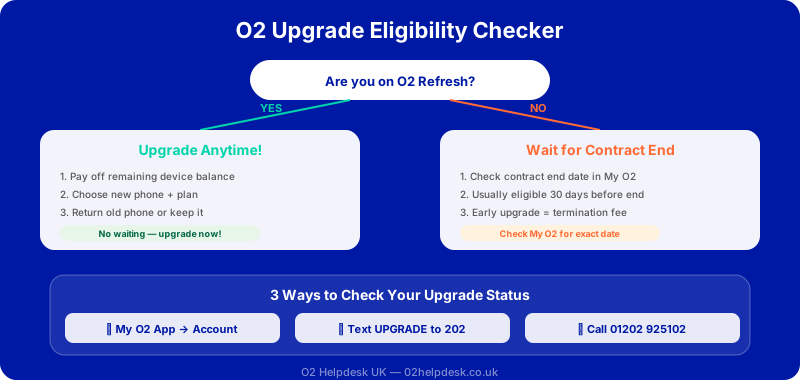
One of the most common questions we receive is: "When am I eligible to upgrade?" The answer depends on several factors, including the type of plan you're on, how long you've had your current device, and whether you're willing to pay any early upgrade fees.
In this guide, we'll explain everything you need to know about O2 upgrade eligibility, how to check your status, and tips for getting the best deal when you do upgrade.
Standard Upgrade Eligibility
For most O2 customers on traditional 24-month contracts, you'll become eligible for a standard upgrade once you've completed the minimum term of your agreement:
- 24-month contracts: Eligible for upgrade after 24 months
- 36-month contracts: Eligible for upgrade after 36 months
- O2 Refresh plans: Eligible to upgrade once your Device Plan is paid off
O2 Refresh: The Flexible Upgrade Option
O2 Refresh has revolutionised how customers upgrade their phones. Unlike traditional contracts where you're locked in for the full term, O2 Refresh separates your bill into two parts:
- Device Plan: The cost of your phone, spread over 24-36 months
- Airtime Plan: Your minutes, texts, and data allowance
With O2 Refresh, you can upgrade as soon as you've paid off your Device Plan. This could be:
- At the end of your original term (typically 24 or 36 months)
- Earlier if you choose to pay off your remaining Device Plan balance
- Anytime by trading in your current device to offset the remaining balance
How to Check Your O2 Upgrade Eligibility
Method 1: Using the My O2 App
- Download and open the My O2 app on your smartphone
- Log in using your O2 account credentials
- Navigate to the "Upgrade" or "My Device" section
- Your eligibility status will be displayed clearly
Method 2: Online via O2 Website
- Visit o2.co.uk and sign in to your account
- Go to "My Account" or "My O2"
- Look for the "Upgrade" option in your dashboard
Method 3: Text to Check
Text "UPGRADE" to 61202 from your O2 mobile for an instant eligibility update.
Early Upgrades: What You Need to Know
Can't wait for your standard upgrade date? O2 does offer early upgrade options, but they come with costs:
Early Upgrade Fee
If you're not on O2 Refresh, you'll need to pay an early upgrade fee. This is typically calculated based on how many months remain on your contract.
Paying Off Your Device Plan
On O2 Refresh, you can upgrade early by paying off your remaining Device Plan balance. This gives you maximum flexibility.
Tips for Getting the Best O2 Upgrade Deal
1. Time Your Upgrade Strategically
Certain times of year offer better upgrade deals:
- Black Friday (November): Some of the year's best deals
- Boxing Day/January Sales: Excellent discounts on previous models
- New Phone Launches: Older models see price drops
2. Compare All Available Options
Don't just accept the first offer you see. Compare different device storage capacities, contract lengths, and plan tiers.
3. Maximise Your Trade-In Value
- Keep your current phone in excellent condition
- Use a case and screen protector from day one
- Trade in before your device loses significant value
4. Don't Overlook the Total Cost
When comparing deals, calculate the total cost over the contract term. A lower monthly cost over a longer period may actually cost more overall.
Need Personalised Upgrade Advice?
Our independent O2 specialists can check your eligibility, compare deals, and help you choose the perfect device. Learn how O2 Refresh works to understand your upgrade options, or explore our tips to reduce your O2 bill before upgrading.