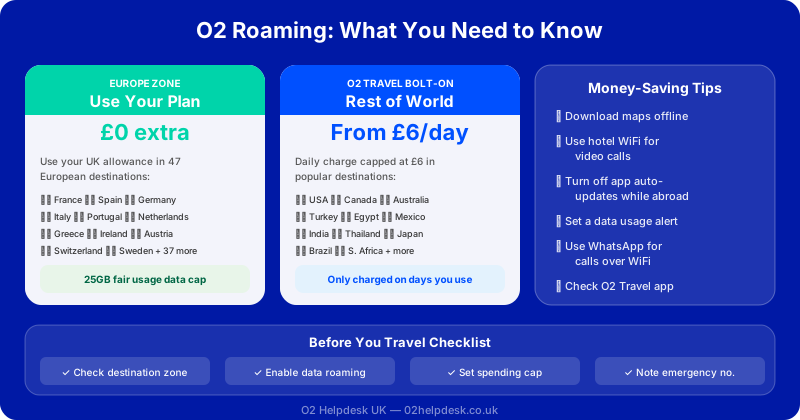
Travelling abroad with your O2 phone? Understanding roaming charges and options is essential to avoid unexpected bills. This comprehensive guide covers everything you need to know about using your O2 phone overseas.
O2 Roaming Zones Explained
O2 divides the world into different roaming zones, each with different charges. For the latest regulatory guidance on mobile roaming, see Ofcom's official website.
| Zone | Countries | Charges |
|---|---|---|
| Zone 1 (Europe) | EU countries, Iceland, Liechtenstein, Norway | Included in UK allowance (with fair use limits) |
| Zone 2 | USA, Canada, Australia, New Zealand, etc. | O2 Travel Inclusive Zone bolt-on available |
| Zone 3 | Rest of the world | Standard roaming rates apply |
Roaming in Europe (Zone 1)
Since Brexit, roaming rules have changed. Here's what you need to know:
O2's Europe Zone
O2's Europe Zone includes:
- All EU member states
- Iceland, Liechtenstein, Norway
- Andorra, Monaco, San Marino, Vatican City
What You Get
If you have a Volt or Plus Plan, or selected tariffs, you can use your UK allowance in Europe at no extra cost, subject to a 25GB fair use limit per billing period.
O2 Travel Inclusive Zone (Zone 2)
For travel to countries outside Europe, O2 offers the O2 Travel Inclusive Zone bolt-on:
Included Countries
USA, Canada, Mexico, Australia, New Zealand, and many more.
What's Included
- Unlimited minutes and texts
- Data allowance (varies by plan)
- All for a daily charge only on days you use your phone
How to Add O2 Travel
- Via the My O2 app
- Online at o2.co.uk
- By calling customer service
How to Avoid Roaming Bill Shock
Before You Travel
Preparation is the single most important step in avoiding unexpected roaming charges. Taking ten minutes before your trip to check your plan settings can save you hundreds of pounds.
- Check your roaming settings in the My O2 app — verify which zone your destination falls into
- Add an appropriate bolt-on if travelling outside Zone 1. The O2 Travel bolt-on for Zone 2 countries is far cheaper than paying standard rates
- Download offline maps for your destination using Google Maps or Apple Maps. This prevents heavy data usage for navigation
- Set a spending cap in the My O2 app. O2 allows you to set a monthly spending limit that prevents bill shock from accidental roaming data usage
- Update your apps before departing. App updates over roaming data can consume large amounts of your allowance
While Abroad
Once you arrive at your destination, follow these practices to keep your roaming costs under control:
- Use Wi-Fi calling when connected to hotel or restaurant Wi-Fi — calls route through the internet at no extra cost
- Turn off automatic app updates and background app refresh in your phone settings
- Disable data roaming for non-essential apps like social media and streaming services
- Monitor your usage regularly through the My O2 app to track how much data you've consumed
- Avoid streaming video or music over mobile data — a single hour of HD video can use 3GB of data
- Use messaging apps like WhatsApp or iMessage over Wi-Fi instead of sending international texts
O2 Spending Caps and Data Limits Abroad
O2 provides several safety mechanisms to prevent excessive roaming charges:
Automatic Data Spending Cap
When roaming outside the EU, O2 applies an automatic spending cap of £45 per month on data. Once you reach this limit, your data connection is suspended until you actively choose to continue. This prevents the horror stories of returning home to a £500+ bill.
EU Fair Use Policy
Within Europe (Zone 1), O2 applies a fair use limit of 25GB per billing period. This is designed to prevent permanent roaming — using a UK SIM abroad full-time. For most holiday and business travellers, 25GB is more than sufficient for a two-week trip.
How to Check Your Roaming Usage
- Open the My O2 app and tap on "Usage"
- Text FREE to 4444 to receive a text summary of your remaining allowance
- Dial *#100# to check your balance (PAYG customers)
Cruise Ship and Flight Roaming Warning
One of the most expensive roaming traps is cruise ship and in-flight connectivity. These services do not fall under any O2 roaming zone and use satellite networks with extremely high charges.
Similarly, some airlines offer in-flight mobile connectivity. While convenient, these services charge premium rates that are not covered by any O2 bolt-on. Check the airline's pricing before connecting.
Local SIM Card vs O2 Roaming
For longer trips or frequent travellers, buying a local SIM card at your destination can be significantly cheaper than using O2 roaming. Here's how they compare:
| Factor | O2 Roaming | Local SIM Card |
|---|---|---|
| Convenience | No setup needed — just arrive and use | Need to buy and activate at destination |
| Keep UK number | Yes — same number works abroad | No — you get a local number |
| Cost (1 week Europe) | Free with allowance | £5-15 for local data SIM |
| Cost (1 week USA) | £5-7/day with bolt-on | £15-25 for local prepaid SIM |
| Data speeds | May be throttled after fair use | Full local speeds |
| Dual SIM benefit | N/A | Keep O2 SIM for calls, local SIM for data |
If your phone supports eSIM, you can add a travel eSIM for data while keeping your O2 physical SIM for calls and texts — the best of both worlds.
Roaming Charges by Zone
| Zone | Calls (per minute) | Texts (per message) | Data (per MB) |
|---|---|---|---|
| Zone 1 (with allowance) | Included | Included | Included (up to 25GB) |
| Zone 2 (with bolt-on) | Included | Included | Included |
| Zone 3 | £2.00 | 50p | £6.00 |
| Cruise ships/flights | £3.00+ | £1.00+ | £6.00+ |
What to Do If You Get Unexpected Roaming Charges
If you return home to find unexpected roaming charges on your bill, don't panic. Here's what to do:
- Check your bill carefully — identify exactly which charges are from roaming. Our O2 bill explained guide can help you understand each line item
- Contact O2 customer service — explain the charges and ask for a review. O2 will often issue goodwill credits for first-time roaming bill shock
- Dispute the charges formally if O2 refuses to help. Follow our step-by-step dispute guide to escalate through the complaints process
- Set up a spending cap immediately to prevent it happening again
Frequently Asked Questions
Can I use my O2 phone in the USA?
Yes. The USA is in O2's Zone 2. You'll need to add the O2 Travel bolt-on before travelling, which gives you calls, texts, and data at a daily rate (only charged on days you use your phone).
Does O2 still offer free EU roaming after Brexit?
O2 continues to include EU roaming at no extra cost for most pay monthly plans, subject to a 25GB fair use limit. However, this is a voluntary policy by O2 — not a legal requirement — so it could change in the future.
Will my phone work in every country?
Most modern smartphones work on international networks. However, some older or budget phones may not support all frequency bands. Check your phone's specifications before travelling to less common destinations.
Can I receive calls for free while abroad?
In Zone 1 (Europe), receiving calls is included in your allowance. In Zones 2 and 3, you may be charged for receiving calls. With the O2 Travel bolt-on for Zone 2, receiving calls is included.
What happens if I go over my roaming data limit?
In Europe, you'll be charged £3.50 per GB over the 25GB fair use limit. Outside Europe without a bolt-on, standard Zone 2/3 rates apply. O2's automatic spending cap will pause your data at £45 to prevent runaway charges.
Should I turn off data roaming on my phone?
If you don't have an appropriate roaming plan or bolt-on, turning off data roaming is the safest option. You can still use Wi-Fi for internet access and Wi-Fi calling for phone calls.
Planning to Travel?
Contact us before you travel to ensure you have the right roaming package and avoid unexpected charges. Our advisors can check your plan, recommend the best bolt-on for your destination, and help you set up spending caps. If you've already received unexpected roaming charges, we can help you dispute them.