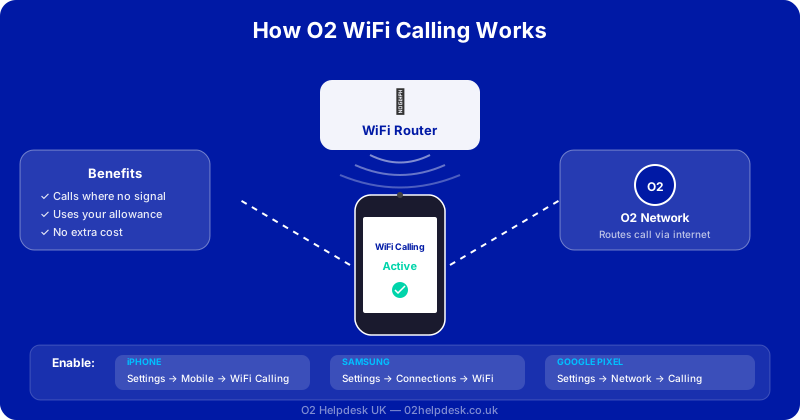
WiFi Calling is one of the most useful features available on O2, yet many customers do not even know it exists. If you live or work in an area with poor mobile signal but have access to a WiFi network, WiFi Calling allows you to make and receive phone calls and text messages over your WiFi connection instead of relying on O2's mobile signal.
The best part is that WiFi Calling is completely free on O2 and uses your existing plan allowance. Calls made over WiFi are treated exactly the same as calls made over the mobile network, so they come out of your inclusive minutes. There are no additional charges for using this feature.
What Is WiFi Calling and How Does It Work?
WiFi Calling uses your broadband internet connection to route phone calls and text messages instead of the mobile network. When your phone detects that mobile signal is weak but a WiFi connection is available, it automatically switches to using WiFi for calls and texts. This happens seamlessly in the background without you needing to do anything differently.
From the caller's perspective, nothing changes. You dial numbers the same way, and people calling you will reach you on your normal O2 number. The only visible difference is a small WiFi Calling indicator that appears in your phone's status bar when the feature is active.
Benefits of O2 WiFi Calling
- Better indoor coverage: Buildings with thick walls, basements, and rural properties often have poor mobile signal. WiFi Calling solves this by using your broadband connection instead
- No extra cost: WiFi Calling uses your existing O2 plan allowance. Calls and texts are deducted from your inclusive minutes and texts just as they would be on the mobile network
- Improved call quality: When you have a strong WiFi connection, call quality is often better than a weak mobile signal. HD Voice is supported over WiFi Calling
- Works abroad: WiFi Calling works when you are connected to WiFi overseas. Calls are treated as UK calls, so you avoid roaming charges for calls made over WiFi
- Automatic switching: Your phone intelligently switches between mobile network and WiFi Calling based on signal strength, so you always get the best connection
Compatible Devices for O2 WiFi Calling
Apple iPhone
- iPhone 5S and all later models
- Must be running iOS 10.3 or later (latest version recommended)
Samsung Galaxy
- Samsung Galaxy S6 and later S series models
- Samsung Galaxy A series (A40 and later)
- Samsung Galaxy Z Fold and Z Flip series
- Samsung Galaxy Note 10 and later
Google Pixel
- Google Pixel 3 and all later models
Other Brands
- Selected Huawei, Xiaomi, and OnePlus devices
- Check the O2 website or your phone's settings to confirm compatibility
How to Enable WiFi Calling on iPhone
- Open Settings
- Tap Phone (or Mobile Data on some iOS versions)
- Tap WiFi Calling
- Toggle WiFi Calling on This iPhone to on
- If prompted, enter or confirm your emergency address (this is required for emergency services to locate you when calling over WiFi)
- You should see a "WiFi" label next to your carrier name in the status bar when the feature is active
How to Enable WiFi Calling on Android and Samsung
- Open Settings
- Tap Connections (or Network & Internet)
- Tap WiFi Calling (or look under More Connection Settings)
- Toggle WiFi Calling to on
- Choose your preferred calling mode:
- WiFi Preferred: Uses WiFi when available, falls back to mobile network
- Mobile Network Preferred: Uses mobile network first, falls back to WiFi
- Enter your emergency address when prompted
On Samsung devices specifically, you can also find WiFi Calling by going to the Phone app, tapping the three-dot menu, selecting Settings, and looking for WiFi Calling.
WiFi Calling vs VoLTE: What Is the Difference?
| Feature | WiFi Calling | VoLTE (Voice over LTE) |
|---|---|---|
| Connection used | WiFi (broadband) | 4G/LTE mobile network |
| Best for | Poor mobile signal areas | Areas with good 4G coverage |
| Call quality | HD Voice (depends on WiFi speed) | HD Voice |
| Uses data allowance | No (uses broadband) | No (uses voice channel) |
| Works abroad | Yes (on WiFi) | Limited (depends on roaming agreements) |
| Battery impact | Lower (WiFi uses less power) | Standard |
| Setup required | Must enable in settings | Usually enabled by default |
WiFi Calling Abroad: Does It Work?
Yes, O2 WiFi Calling works when you are connected to WiFi abroad. This is one of its biggest advantages for travellers. When you make a call over WiFi from another country, the call is treated as if you were in the UK. This means it comes out of your UK allowance and you do not incur roaming charges.
This makes WiFi Calling an excellent way to save money when travelling. As long as you have access to WiFi at your hotel, Airbnb, or a cafe, you can call UK numbers without worrying about international call rates.
Troubleshooting O2 WiFi Calling Issues
WiFi Calling Option Not Available
- Check your device is compatible (see list above)
- Update your phone's software to the latest version
- Update your carrier settings (iPhone: Settings, General, About)
- Make sure your O2 SIM is active and your account is in good standing
- Restart your phone after updating
Calls Dropping on WiFi
- Check your WiFi signal strength. WiFi Calling needs a stable connection with at least 2 Mbps upload and download speed
- Move closer to your WiFi router
- Reduce the number of devices using your WiFi network
- Restart your router
- If your router supports it, connect to the 5GHz band for less interference
Poor Call Quality Over WiFi
- Test your broadband speed. You need at least 2 Mbps for clear calls
- Close bandwidth-heavy apps (streaming, downloads) during calls
- Check if QoS (Quality of Service) settings on your router can prioritise voice traffic
- If issues persist, your broadband connection may not be reliable enough for WiFi Calling
WiFi Calling and Voicemail
WiFi Calling works seamlessly with your O2 voicemail. If you miss a call while on WiFi, it will go to voicemail just as it would on the mobile network. There is no additional setup needed.
WiFi Calling and Emergency Calls
WiFi Calling supports emergency calls to 999 and 112 when you are in the UK. When you enable WiFi Calling, you are asked to register your address. This address is shared with emergency services if you call 999 over WiFi, since they cannot determine your location from WiFi the way they can from a mobile signal.
It is important to keep your registered address up to date. If you move house, update your emergency address in your WiFi Calling settings. If you are at a different location when you need to call 999, be prepared to tell the operator your exact location, as the registered address may not match where you actually are.
Frequently Asked Questions
Does WiFi Calling use my mobile data?
No. WiFi Calling uses your WiFi (broadband) connection, not your mobile data allowance. It uses your inclusive call minutes and texts from your O2 plan, but the data transmission happens over WiFi.
Can I use WiFi Calling on any WiFi network?
Yes, WiFi Calling works on any WiFi network, whether it is your home broadband, a hotel network, or a public hotspot. However, some public WiFi networks may have firewalls that block the ports needed for WiFi Calling. If it does not work on a particular network, the mobile network will be used instead.
Will my phone switch between WiFi and mobile during a call?
In most cases, if you start a call on WiFi and then move out of WiFi range, the call will drop. However, some newer devices support seamless handover between WiFi and mobile network during a call. Check your phone's specifications for "VoWiFi to VoLTE handover" support.
Is WiFi Calling available on O2 Pay As You Go?
Yes, WiFi Calling is available on both pay monthly and pay as you go O2 plans, as long as your device supports it.
Can I disable WiFi Calling?
Yes, simply go back to the WiFi Calling setting on your phone and toggle it off. Your phone will then only use the mobile network for calls and texts.
Does WiFi Calling work with no mobile signal at all?
Yes, that is one of its key benefits. Even if you have zero mobile signal (for example, in a basement), you can still make and receive calls over WiFi. Your phone does not need any mobile signal for WiFi Calling to work.
Need Help with WiFi Calling?
Our O2 technical specialists can help you set up WiFi Calling, troubleshoot connection issues, and optimise your settings for the best call quality. If you are experiencing signal problems, WiFi Calling may be the perfect solution.