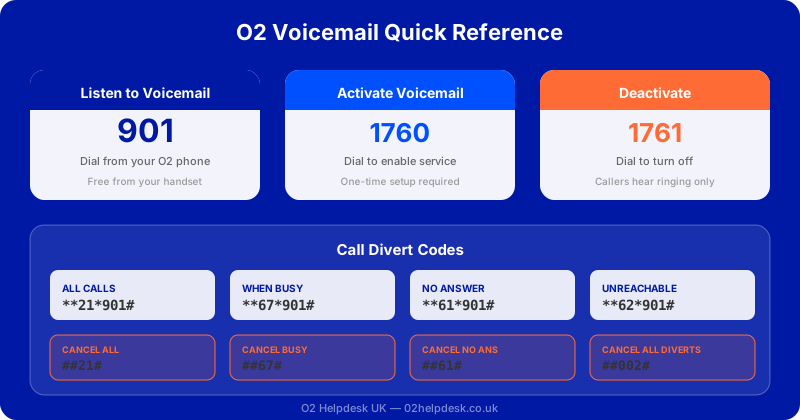
Voicemail is an essential feature that ensures you never miss important calls when you're unavailable. For full details on O2's voicemail service, you can also visit O2's official support page. This complete guide covers everything you need to know about setting up and managing your O2 voicemail service.
Setting Up O2 Voicemail for the First Time
If you've never used O2 voicemail before, here's how to get started:
Step 1: Activate Voicemail
- Dial 901 from your O2 mobile
- Follow the voice prompts to set up your voicemail
- Create a secure PIN (4-6 digits)
- Record your personal greeting
Step 2: Choose Your Greeting
You have several greeting options:
- Personal greeting: Record your own message
- Standard greeting: "The person you are calling is not available..."
- Name greeting: "[Your name] is not available..."
Accessing Your Voicemail
From Your O2 Phone
- Dial 901
- Or press and hold the "1" key
- Enter your PIN when prompted
From Another Phone
- Dial your O2 mobile number
- Wait for voicemail to answer
- Press * (star) during the greeting
- Enter your O2 mobile number
- Enter your PIN
From Abroad
- Dial +44 7802 090901
- Enter your O2 mobile number
- Enter your PIN
Voicemail Menu Options
Once you've accessed your voicemail, you'll hear the main menu:
| Press | Function |
|---|---|
| 1 | Listen to messages |
| 2 | Change folders (new, saved, deleted) |
| 3 | Greeting options |
| 4 | Personal options (PIN, etc.) |
| 5 | Send a message to another O2 user |
| 0 | Help |
| * | Return to main menu |
| # | End call |
Managing Your Messages
While Listening to a Message
- Press 1: Replay message
- Press 2: Save message
- Press 3: Delete message
- Press 4: Reply to message (O2 to O2 only)
- Press 5: Forward message
- Press 6: Hear message details (time, date)
- Press 7: Skip back 5 seconds
- Press 8: Pause/Resume
- Press 9: Skip forward 5 seconds
Troubleshooting Common Voicemail Issues
"Voicemail Not Set Up" Error
If you hear this message when calling your own number:
- Dial 901 to activate voicemail
- Follow the setup prompts
- Test by calling your number from another phone
Forgotten PIN
If you've forgotten your voicemail PIN:
- Dial 901
- When asked for your PIN, press * (star)
- Follow the prompts to reset your PIN
Voicemail Not Picking Up
If calls aren't going to voicemail:
- Check call forwarding settings on your phone
- Ensure voicemail is activated (dial 901)
- Contact O2 if problems persist
Having Voicemail Problems?
Our technical support team can help you set up voicemail, reset your PIN, or troubleshoot any issues you're experiencing.
Average answer time under 60 seconds
Visual Voicemail on O2
Visual Voicemail is a feature available on most modern smartphones that lets you see a list of your voicemails and play them in any order, without having to dial 901. It is a significant upgrade from the traditional phone-based voicemail system.
Setting Up Visual Voicemail on iPhone
Most iPhones on O2 support Visual Voicemail natively. To set it up:
- Open the Phone app on your iPhone
- Tap the Voicemail tab at the bottom right
- If prompted, tap Set Up Now
- Create a voicemail password (this is separate from your network PIN)
- Choose a greeting type — Default or Custom
- If you choose Custom, record your greeting and tap Save
Once configured, your voicemails will appear as a list in the Voicemail tab. You can tap any message to play it, see its duration, and read a transcription if your iPhone supports it (available on iPhone 6s and later with iOS 10+).
Setting Up Visual Voicemail on Android
Visual Voicemail availability on Android depends on both your phone model and your O2 plan. Many Samsung Galaxy, Google Pixel, and OnePlus devices support it. To check and set up:
- Open the Phone app
- Tap the three dots (menu) in the top right
- Select Settings > Voicemail
- Look for Visual Voicemail — if available, toggle it on
- If not available, you may need to download a voicemail app from the Google Play Store or contact O2 to check plan eligibility
Visual Voicemail Transcription
iPhones running iOS 10 or later can automatically transcribe voicemails into text. This is incredibly useful when you are in meetings or noisy environments. The transcription appears directly below each voicemail in the list. While not always perfectly accurate, it gives you a quick summary of what the caller said without needing to listen to the full message.
O2 Voicemail Costs and Charges
Understanding the costs associated with O2 voicemail helps you avoid unexpected charges on your bill. If you are concerned about billing, check out our complete guide to understanding your O2 bill.
| Action | Cost | Notes |
|---|---|---|
| Receiving a voicemail | Free | The caller pays their normal call rate |
| Listening to voicemail (UK) | Free from O2 mobiles | Dialling 901 is free on most O2 plans |
| Listening to voicemail (abroad) | Roaming charges apply | Check our O2 roaming guide for rates |
| Missed call alerts | Free | Text alerts sent automatically |
| Voicemail storage | Free | Messages stored for up to 30 days |
| Voicemail to email | Not available | Use Visual Voicemail as alternative |
Advanced Voicemail Settings
Changing How Long Before Voicemail Picks Up
By default, O2 voicemail answers after about 15 seconds (4-5 rings). You can change this delay to give yourself more time to answer, or reduce it so callers reach voicemail faster:
- Open your phone's dialler
- Enter
**61*+447802090901**[seconds]#and press call - Replace
[seconds]with your preferred delay: 5, 10, 15, 20, 25, or 30 - You will hear a confirmation tone
For example, to set a 25-second delay before voicemail picks up, dial **61*+447802090901**25#.
Turning Off Voicemail Completely
If you do not want voicemail at all, you can deactivate it:
- Dial
##002#from your O2 mobile and press call - This removes all call forwarding to voicemail
- To reactivate voicemail later, dial 901
Conditional Call Forwarding
O2 allows you to set different forwarding rules for different scenarios:
| Scenario | Activate Code | Deactivate Code |
|---|---|---|
| No answer | **61*+447802090901# | ##61# |
| Busy | **67*+447802090901# | ##67# |
| Not reachable | **62*+447802090901# | ##62# |
| All calls | **21*+447802090901# | ##21# |
O2 Voicemail vs Other Networks
How does O2's voicemail service compare with other UK mobile networks? Here is a quick comparison to help you understand the differences. For a broader network comparison, see our O2 vs EE comparison guide.
| Feature | O2 | EE | Three | Vodafone |
|---|---|---|---|---|
| Access number | 901 | 121 | 123 | 121 |
| Visual Voicemail | Yes (iPhone/select Android) | Yes | Yes | Yes |
| Listening cost (UK) | Free | Free | Free | Free |
| Message storage | 30 days | 30 days | 21 days | 30 days |
| Max message length | 3 minutes | 3 minutes | 2 minutes | 3 minutes |
| Transcription | iPhone only | iPhone only | iPhone only | iPhone only |
Tips for Getting the Most from O2 Voicemail
- Keep your PIN secure: Choose a PIN that is not easy to guess (avoid 1234, 0000, or your birth year). Change it regularly for security.
- Record a professional greeting: If you use your phone for business, record a clear, professional greeting that includes your name and a brief message.
- Check messages regularly: Messages are automatically deleted after 30 days, so make sure to listen and save important ones.
- Use Visual Voicemail: If your phone supports it, Visual Voicemail is faster and more convenient than dialling 901.
- Set the right ring time: If you find yourself missing calls because voicemail picks up too quickly, increase the ring time to 25 or 30 seconds.
- Check signal strength: Voicemail issues are sometimes caused by poor signal. See our guide to fixing O2 signal problems if you are experiencing dropped calls.
- Consider WiFi Calling: If you have poor signal indoors, enabling WiFi Calling can ensure voicemail is properly set up and calls are routed correctly even with weak mobile signal.
Frequently Asked Questions
Is O2 voicemail free?
Yes, listening to voicemail by dialling 901 from your O2 mobile in the UK is free on most O2 plans. However, accessing voicemail while abroad will incur roaming charges. Receiving voicemail messages is always free — the caller pays their normal call rate.
How do I reset my O2 voicemail PIN?
Dial 901 from your O2 mobile. When prompted for your PIN, press the star (*) key. Follow the automated prompts to create a new PIN. If this does not work, contact O2 customer service or call us on 01202 925102 for assistance.
Why is my O2 voicemail not working?
Common reasons include: voicemail not being activated (dial 901 to activate), call forwarding settings being changed on your phone, poor signal strength preventing calls from reaching voicemail, or a network outage in your area. Try restarting your phone and checking your APN settings if the issue persists.
How long are O2 voicemail messages stored?
O2 stores voicemail messages for up to 30 days. After 30 days, unlistened and unsaved messages are automatically deleted. Saved messages are kept for an additional 30 days from the date you saved them. It is good practice to regularly check and save important messages.
Can I access O2 voicemail from a landline?
Yes. Dial your O2 mobile number from any phone. Wait for the voicemail greeting to start, then press the star (*) key. Enter your O2 mobile number followed by the hash (#) key, then enter your voicemail PIN. Standard call charges from the landline will apply.
How do I turn off O2 voicemail?
Dial ##002# from your O2 mobile and press call. This disables all call forwarding to voicemail. Callers will hear the phone ring without being diverted. To reactivate voicemail at any time, simply dial 901.
Does O2 offer voicemail to email?
O2 does not currently offer a voicemail-to-email service. However, you can use Visual Voicemail on supported smartphones to see and manage voicemails directly on your device without calling 901. iPhone users can also benefit from automatic voicemail transcription.