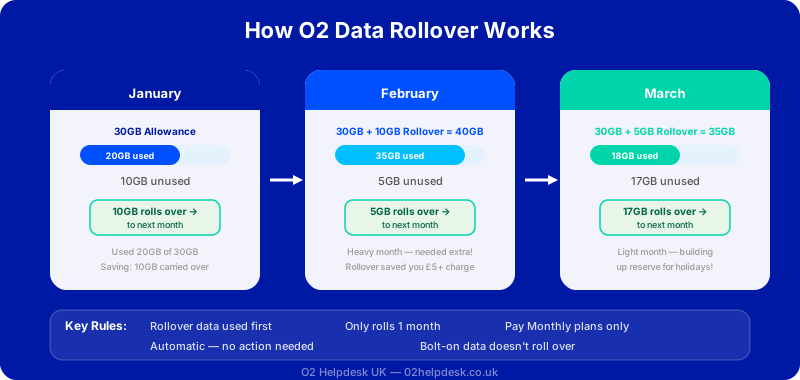
Most of us have been there: you are paying for a generous data allowance each month but barely using half of it. That unused data used to simply vanish at the end of each billing cycle. With O2's data rollover feature, those wasted gigabytes are now carried forward to the next month, giving you extra data when you need it most.
Data rollover is one of those features that sounds straightforward but has some nuances that are worth understanding. This guide explains exactly how O2 data rollover works, which plans include it, and how to make the most of it.
What Is O2 Data Rollover?
Data rollover is a feature offered by O2 that carries your unused data from one month to the next. If your O2 plan includes 20GB of data and you only use 12GB in a given month, the remaining 8GB rolls over and is added to your next month's allowance. So in the following month, you would have 28GB available (your standard 20GB plus the 8GB carried over).
This is particularly useful during months when your usage varies. You might use very little data during a quiet month at home, but then need extra data when you are travelling or streaming more content. Data rollover gives you that flexibility without having to pay for a larger plan or buy data add-ons.
Which O2 Plans Include Data Rollover?
Data rollover is available on most O2 pay monthly plans, but there are some important distinctions:
| Plan Type | Data Rollover Included? | Notes |
|---|---|---|
| Pay Monthly (with device) | Yes | Standard on most plans |
| SIM Only (monthly) | Yes | Available on 12-month and 24-month plans |
| SIM Only (30-day) | Varies | Check specific plan terms |
| Pay As You Go | No | Data expires when bundle expires |
| Unlimited Data Plans | N/A | No rollover needed with unlimited data |
| Business Plans | Varies | Depends on specific business tariff |
How Data Rollover Works Month to Month
Understanding the mechanics of data rollover helps you plan your usage more effectively. Here is how it works in practice:
Example: Three Months of Usage
Suppose you have a 15GB monthly data plan:
- Month 1: You use 10GB out of 15GB. The unused 5GB rolls over to Month 2
- Month 2: You now have 20GB (15GB new + 5GB rolled over). You use 18GB. Only 2GB rolls over to Month 3
- Month 3: You have 17GB (15GB new + 2GB rolled over). You use 8GB. The remaining 9GB rolls over to Month 4
Data Rollover Limits and Caps
While data rollover is a generous feature, there are some limits to be aware of:
- One-month rollover only: Unused data carries over for exactly one billing cycle. Any data that is not used in that next month is lost
- Cap on rollover amount: You can only roll over up to your plan's standard monthly allowance. If you have a 10GB plan, you can roll over a maximum of 10GB (even if theoretically you used none of your data)
- Bonus and promotional data: Data added through promotions, bolt-ons, or O2 Priority rewards typically does not roll over. Only your standard plan data is eligible
- Roaming data: Data used while roaming abroad comes from your standard allowance, but rollover data may have restrictions on international use
How to Check Your Rolled-Over Data Balance
You can check how much rolled-over data you have available through several methods:
My O2 App
- Open the My O2 app
- Your data usage is displayed on the main dashboard
- Tap on the data section to see a breakdown
- Rolled-over data is usually shown separately from your standard allowance
By Text
Text DATA to 21202 from your O2 phone. You will receive a text back with your current data usage and remaining allowance, including any rolled-over data.
Online
Log into your My O2 account on the O2 website and navigate to your usage section. Your data breakdown, including rollover, will be displayed on your bill summary.
Tips to Maximise Your Data Rollover
- Use WiFi whenever possible: Connect to WiFi at home, work, and public hotspots to conserve your mobile data. The less mobile data you use, the more rolls over
- Download content on WiFi: Download music playlists, podcasts, Netflix shows, and maps while on WiFi so you do not use mobile data to stream or download on the go
- Set app updates to WiFi only: Prevent apps from auto-updating over mobile data. On iPhone go to Settings, App Store, and turn off Mobile Data. On Android go to Play Store settings and set auto-update to WiFi only
- Monitor background data: Some apps use data in the background even when you are not actively using them. Check your phone's data usage settings to identify and restrict data-hungry apps
- Use data-saving modes: Both Chrome and many social media apps have data-saving modes that reduce the amount of data used by compressing images and limiting video quality
Data Rollover vs Unlimited Data Plans
| Feature | Capped Plan with Rollover | Unlimited Data Plan |
|---|---|---|
| Monthly cost | Lower | Higher |
| Data worry | Some (need to monitor) | None |
| Best for light users | Yes (pay less, bank unused data) | Overpaying |
| Best for heavy users | May run out even with rollover | Yes (no limits) |
| Tethering/hotspot | Limited by allowance | Often capped or throttled |
| Value for money | Better for moderate users | Better for heavy streamers |
What Happens to Rollover Data When You Change Plan?
If you upgrade, downgrade, or change your O2 plan, your rolled-over data is typically lost. When you switch to a new plan, your billing cycle resets and your data allowance starts fresh based on the new plan's terms. This is important to consider if you have a large amount of rolled-over data that you have been planning to use.
Similarly, if you switch from O2 to another network, any rolled-over data is lost when your O2 contract ends. There is no way to transfer rollover data between providers.
O2 Data Rollover vs Other Networks
| Network | Data Rollover Available? | Rollover Duration | Notes |
|---|---|---|---|
| O2 | Yes | 1 month | Standard on most pay monthly plans |
| EE | Yes | 1 month | Available on selected plans |
| Three | No | N/A | No rollover, but offers unlimited plans |
| Vodafone | Yes | 1 month | Called "Xtra" plans with rollover |
| Sky Mobile | Yes | Up to 3 years | Industry-leading rollover, stored in "piggybank" |
Frequently Asked Questions
Does data rollover happen automatically?
Yes, data rollover is automatic on eligible plans. You do not need to activate it or do anything special. Any unused data at the end of your billing cycle is automatically carried forward to the next month.
Can I roll over data from a bolt-on or data add-on?
Generally no. Data from bolt-ons, add-ons, and promotional offers does not roll over. Only your standard plan data allowance is eligible for rollover.
Does rollover data work for tethering and mobile hotspot?
Yes, rolled-over data can be used for tethering and mobile hotspot just like your standard data allowance. There is no distinction in how it can be used.
Will O2 notify me about my rolled-over data?
O2 typically includes rollover data information in your monthly bill and in the My O2 app. You will not receive a specific notification about rollover, but you can check your balance at any time.
Can I sell or give my rolled-over data to someone else?
No, rolled-over data cannot be transferred to another person or device. It is tied to your specific O2 account and plan.
What happens to rollover data if I do not pay my bill on time?
If your account falls into arrears, your service may be suspended, and any rolled-over data may be affected. It is important to keep your account in good standing to maintain all plan benefits including data rollover.
Not Sure if Your Plan Has Data Rollover?
Our O2 specialists can check your plan details, help you understand your data usage patterns, and advise whether you are on the best plan for your needs. We can also help you find ways to reduce your monthly O2 bill.