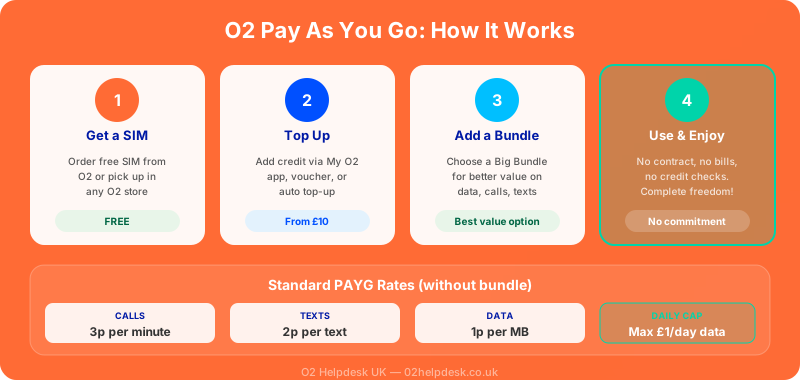
O2 Pay As You Go (PAYG) is the simplest way to use a mobile phone without committing to a monthly contract. You buy credit (top up), and it is deducted as you use calls, texts, and data. There are no credit checks, no long-term commitments, and no surprise bills at the end of the month. You only pay for what you use.
Whether you want a backup phone, a SIM for your child, a temporary number, or simply prefer the freedom of no contracts, O2 PAYG offers a flexible and affordable option. This guide covers everything from choosing the right bundle to topping up and managing your balance.
O2 PAYG Big Bundle Options
O2's Big Bundles give you a set amount of data, minutes, and texts for a fixed price. They offer much better value than paying standard per-minute and per-text rates. Here are the typical bundles available:
| Bundle | Data | Minutes | Texts | Price | Validity |
|---|---|---|---|---|---|
| Small | 1GB | 100 | Unlimited | Around £5 | 30 days |
| Medium | 3GB | Unlimited | Unlimited | Around £8 | 30 days |
| Large | 6GB | Unlimited | Unlimited | Around £10 | 30 days |
| Extra Large | 20GB | Unlimited | Unlimited | Around £15 | 30 days |
| Unlimited | Unlimited | Unlimited | Unlimited | Around £20 | 30 days |
How to Top Up Your O2 PAYG
O2 offers several convenient ways to add credit to your Pay As You Go account:
1. Online via My O2 or O2 Website
- Log into the My O2 app or visit o2.co.uk
- Navigate to the top-up section
- Choose your top-up amount (from £5 to £50)
- Pay with a debit or credit card
- Credit is added to your account instantly
2. My O2 App
The fastest method. Open the My O2 app, tap "Top Up", select the amount, and pay with a saved card. You can also set up automatic top-ups through the app.
3. Top-Up Vouchers
Buy a top-up voucher from shops, supermarkets, and newsagents across the UK. Scratch off the panel to reveal the top-up code, then enter it by calling 4444 from your O2 phone or through the My O2 app.
4. Auto Top-Up
Set up automatic top-ups so you never run out of credit. Choose an amount and a trigger (for example, top up £10 when your balance drops below £2). This is managed through the My O2 app or website.
5. By Phone
Call 4444 from your O2 phone (it is free to call, even with no credit) and follow the automated prompts to top up using your debit or credit card.
6. By Text
If you have set up a payment card on your account, you can top up by texting TOP10 (or TOP20, TOP30, etc.) to 21300. The specified amount will be charged to your card and added to your balance.
How to Check Your O2 PAYG Balance
- My O2 App: Your balance is displayed on the home screen when you open the app
- By text: Text BALANCE to 21202 (free). You will receive a text with your current credit balance and bundle usage
- By phone: Call 4444 (free) and select the balance option
- USSD code: Dial *#10# and press call. Your balance will be displayed on screen
O2 PAYG Rates Without a Bundle
If you use your phone without an active Big Bundle, standard PAYG rates apply. These are significantly more expensive than bundle rates:
| Service | Standard PAYG Rate |
|---|---|
| UK calls | Around 35p per minute |
| UK texts | Around 14p per text |
| Data | Around £1 per day (capped) |
| Voicemail retrieval | Free |
| Calls to 0800 numbers | Free |
PAYG vs Pay Monthly: Which Is Right for You?
| Feature | Pay As You Go | Pay Monthly |
|---|---|---|
| Contract | No contract, complete flexibility | 12-36 month commitment |
| Credit check | Not required | Required |
| Monthly bills | No bills, you pre-pay | Monthly bill via direct debit |
| Cost control | Excellent (cannot spend more than your credit) | Can incur overage charges |
| Value for money | Good for light users | Better for moderate to heavy users |
| Phone included | No (bring your own) | Option to include a phone |
| Data rollover | No | Yes (on most plans) |
| Roaming | Available (charges apply) | EU roaming often included |
For more on saving money with O2, check our tips to reduce your O2 bill.
O2 PAYG SIM Activation
Getting started with O2 PAYG is straightforward:
- Order a free SIM: Order a free O2 PAYG SIM online at o2.co.uk or pick one up from an O2 store
- Insert the SIM: Put the O2 SIM into your unlocked phone
- Activate: Follow the instructions included with the SIM, or visit activate.o2.co.uk
- Top up: Add credit using any of the methods above
- Choose a bundle: Activate a Big Bundle through the My O2 app for the best value
- Start using: You are ready to make calls, send texts, and use data
Using O2 PAYG Abroad
O2 PAYG can be used abroad, but roaming charges apply. Before you travel:
- Check O2's PAYG roaming rates for your destination country
- Consider adding a travel bolt-on if available for PAYG customers
- Use WiFi whenever possible to avoid high data charges
- Turn off data roaming in your phone settings if you do not want to use mobile data abroad
- For extended travel, a local SIM or travel eSIM may be more cost-effective
For detailed roaming information, see our O2 roaming guide.
Keeping Your PAYG Number Active
O2 will disconnect your PAYG number if your SIM has been inactive for too long. To keep your number active:
- Make at least one chargeable activity every 180 days: This can be a call, text, data session, or top-up
- Top up regularly: Even a small top-up resets the inactivity clock
- Set a reminder: If you rarely use your PAYG phone, set a calendar reminder every 5 months to make a call or send a text
Switching from PAYG to Contract (and Vice Versa)
PAYG to Pay Monthly
If you decide you want a monthly plan, you can switch from PAYG to pay monthly while keeping your number. Contact O2 customer service or visit a store. A credit check will be required for pay monthly plans. You can also check SIM only deals for an affordable middle ground.
Pay Monthly to PAYG
When your pay monthly contract ends, you can switch to PAYG if you prefer. Contact O2 to request the change. Your number will be transferred to the PAYG SIM, and you will need to start topping up instead of paying by direct debit.
O2 PAYG for Kids and Secondary Phones
PAYG is an excellent choice for children's phones and secondary devices:
- Cost control: Children cannot run up unexpected bills because they can only use the credit available
- No contract required: No credit checks and no long-term commitment
- Parental oversight: You control how much credit is available and can monitor usage through the My O2 app
- Flexible: Easy to upgrade to a contract when the child is older and more responsible
- Emergency use: A PAYG SIM in a spare phone makes an ideal emergency device. Just top up enough to keep it active
Frequently Asked Questions
Does my O2 PAYG credit expire?
Your credit balance does not expire as long as your SIM remains active (at least one chargeable activity every 180 days). However, Big Bundle allowances expire at the end of each 30-day period and do not roll over.
Can I use O2 PAYG for mobile hotspot/tethering?
Yes, you can use your PAYG data for tethering. The data will be deducted from your active bundle or charged at standard rates if you do not have a bundle.
What happens if I run out of credit during a call?
If you run out of credit during a call, the call will be disconnected. You will need to top up before you can make another call. You can still receive incoming calls and texts with zero credit.
Can I receive calls and texts with no credit?
Yes. You can receive incoming calls and texts even if your credit balance is zero. You just cannot make outgoing calls, send texts, or use data until you top up.
Is there a minimum top-up amount?
The minimum top-up is typically £5 when topping up online or by card. Top-up vouchers are available in denominations from £10 upwards at most retailers.
Can I get 5G on O2 PAYG?
5G availability on PAYG plans may vary. Check with O2 for the latest information on PAYG 5G access. You will also need a 5G-compatible phone.
Need Help with O2 Pay As You Go?
Our O2 specialists can help you choose the right PAYG bundle, troubleshoot top-up issues, and advise whether PAYG or a monthly plan is better value for your usage. If you are considering switching to a monthly plan, check our SIM only deals guide.