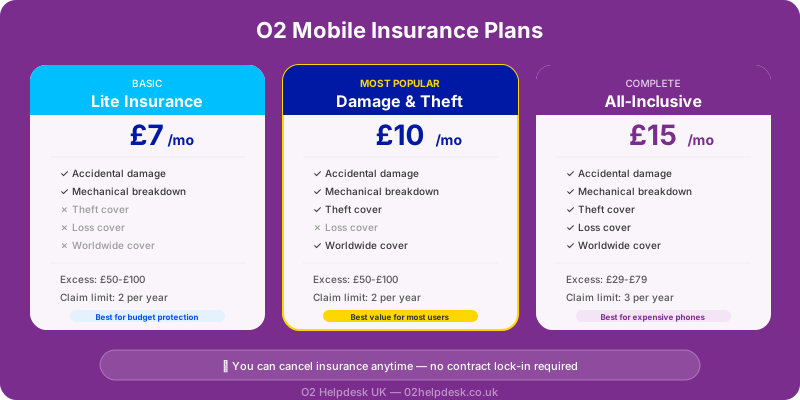
With flagship smartphones now costing well over a thousand pounds, protecting your device against damage, loss, and theft has never felt more important. O2 offers its own mobile insurance product — but is it actually worth the monthly premium, or are you better off with a third-party provider or simply going without?
In this guide, we'll take an honest, in-depth look at O2 mobile insurance. We'll cover exactly what's included, what's excluded, how much it costs, what you'll pay in excess fees if you need to claim, and how it stacks up against alternatives. Whether you've just bought a new phone on an O2 Refresh contract or you're reconsidering an existing insurance add-on, this guide will help you make an informed decision.
What Is O2 Mobile Insurance?
O2 mobile insurance, sometimes referred to as O2 Insure, is an optional add-on that you can take out when you purchase a new phone or at any point during your contract. It's designed to cover your device against a range of common mishaps that manufacturers' warranties don't cover, such as accidental damage, theft, and loss.
The policy is underwritten by a third-party insurer (not O2 themselves), and it works like most gadget insurance products: you pay a monthly premium, and if something happens to your phone, you make a claim and pay an excess fee to receive a repair or replacement device.
It's worth understanding that O2 mobile insurance is entirely separate from your airtime or device plan charges. If you're unsure what you're currently paying for, take a look at our guide to understanding your O2 bill, which explains how each charge on your statement breaks down.
What Does O2 Mobile Insurance Cover?
O2's device insurance typically covers the following scenarios:
Accidental Damage
This is by far the most common reason people claim on phone insurance. Accidental damage covers situations like dropping your phone on a hard surface and cracking the screen, spilling liquid on it, or sitting on it and bending the frame. The key word here is "accidental" — the damage must be unintentional and unexpected.
Theft
If your phone is stolen, O2 insurance will provide a replacement device. However, there are important conditions attached. You'll generally need to report the theft to the police and obtain a crime reference number before you can make a claim. The insurer may also investigate the circumstances to ensure the claim is legitimate.
Loss
Some tiers of O2 mobile insurance cover loss, meaning you can claim if you simply misplace your phone and cannot find it. This is one of the more generous aspects of O2's offering, as many third-party insurers do not cover loss at all, or charge a significantly higher premium for it.
Breakdown Outside Warranty
Once your manufacturer's warranty expires (typically after 12 months for most handsets), O2 insurance can cover mechanical or electrical breakdowns that aren't caused by accidental damage. This means if your phone's charging port stops working or the speaker fails after the warranty period, you may still be covered.
Unauthorised Calls After Theft
If your phone is stolen and the thief runs up charges on your account before you manage to block the SIM, some O2 insurance policies will cover a portion of these unauthorised call costs. If you have a dispute about an insurance claim, the Financial Ombudsman Service can help resolve it. There is usually a cap on this amount, so it's important to report theft and block your SIM as quickly as possible.
Accessories
O2 insurance may also cover accessories that were purchased alongside the phone, such as cases or headphones, up to a certain value. Check the specific terms of your policy for the accessory cover limit.
What O2 Mobile Insurance Does NOT Cover
Understanding the exclusions is just as important as knowing what's covered. Here are the key things that O2 mobile insurance typically will not pay out for:
- Cosmetic damage: Minor scratches, scuffs, or dents that don't affect how the phone works are generally not covered. If your phone has a small scratch on the back but still functions perfectly, don't expect a successful claim.
- Pre-existing damage: Any damage that existed before you took out the policy won't be covered. The insurer may request photos or check service records.
- Deliberate damage: If you intentionally damage your phone (for example, to try to get an upgrade), this is fraud and will not be covered.
- Damage from modifications: If you've jailbroken your phone, installed unofficial software, or made hardware modifications, any resulting damage may not be covered.
- Wear and tear: General degradation over time, such as battery capacity reducing with age, is considered normal wear and tear and is excluded.
- Leaving your phone unattended: If you leave your phone on a table in a pub and walk away, and it gets stolen, the insurer may reject the claim on the grounds that you didn't take reasonable care of the device.
- Claims without evidence: For theft claims, you'll need a police crime reference number. For loss, you'll need to provide details of when and where the phone was last seen. Claims without supporting evidence are routinely rejected.
- Data loss: O2 insurance covers the physical device, not the data stored on it. Photos, contacts, and apps that aren't backed up will not be recovered or compensated for.
How Much Does O2 Mobile Insurance Cost?
The monthly premium for O2 mobile insurance varies depending on the value of your device. More expensive phones cost more to insure, which makes sense given that they cost more to repair or replace. Here's a general overview of how O2 structures its pricing:
Pricing Tiers
O2 typically groups devices into pricing bands based on their retail value. While exact prices change over time as O2 updates its offerings, the structure generally works as follows:
- Budget phones (under £300 RRP): These tend to have the lowest monthly premiums, often in the range of a few pounds per month. However, at this price point, you should seriously consider whether the total insurance cost over two years might approach the cost of simply buying a replacement.
- Mid-range phones (£300–£600 RRP): Monthly premiums sit in the middle ground. The value proposition begins to make more sense here, particularly if your phone is closer to the £600 mark.
- Flagship phones (£600–£1,000+ RRP): The highest monthly premiums apply to flagship devices like the latest iPhone Pro or Samsung Galaxy Ultra models. These premiums reflect the high repair and replacement costs for these devices.
To find the exact current price for your specific device, check the O2 website or the My O2 app, where you can see the monthly cost before adding insurance to your account.
Annual Cost Consideration
When evaluating whether O2 mobile insurance represents good value, it's essential to calculate the total cost over the life of your contract. Multiply the monthly premium by 24 months (for a typical two-year contract period), and then add the excess fee you'd need to pay if you made a claim. This gives you the true cost of using the insurance once. Compare that figure to the cost of repairing or replacing your phone out of pocket.
Understanding Excess Fees
The excess fee is the amount you pay towards any claim. It's separate from your monthly premium and is charged each time you make a claim. O2's excess fees vary depending on the type of claim and the value of your device:
- Accidental damage claims tend to have a lower excess fee, as the insurer is repairing rather than replacing the device.
- Theft and loss claims typically carry a higher excess fee, as a full replacement device is provided.
Excess fees for high-value devices can be substantial. Before taking out insurance, check what the excess would be for your specific phone model, and factor this into your cost-benefit analysis.
How to Make an O2 Insurance Claim
If you need to make a claim on your O2 mobile insurance, follow these steps:
Step 1: Report the Incident
For theft, report the incident to the police as soon as possible and obtain a crime reference number. For loss, make a note of when and where you last had the phone. For accidental damage, take photos of the damage before attempting any repairs.
Step 2: Block Your SIM
If your phone has been stolen or lost, contact O2 immediately to block your SIM card. This prevents unauthorised use and is also a requirement for most insurance claims. You can do this through the My O2 app, by calling O2 customer service, or by visiting an O2 store.
Step 3: Submit Your Claim
Contact the insurance provider (the details will be in your policy documents or on your My O2 account) to begin the claims process. You'll need to provide:
- Your policy number
- Details of what happened (when, where, how)
- A police crime reference number (for theft)
- Your phone's IMEI number (usually found on the original box, or by dialling *#06# on most phones)
- Proof of purchase or proof that the device is covered under your policy
Step 4: Pay the Excess
Once your claim is approved, you'll be asked to pay the excess fee. This is usually taken by card payment before the repair or replacement is arranged.
Step 5: Receive Your Repair or Replacement
For accidental damage, the insurer may arrange a repair (either by sending the phone away or directing you to an authorised repair centre). For theft or loss, a replacement device will be sent to you, usually within a few working days. Note that replacement devices may be refurbished rather than brand new, which is standard practice across the insurance industry.
Common Reasons Claims Are Rejected
Understanding why claims fail can help you avoid pitfalls:
- Filing a claim too late (most policies require claims within a set timeframe, often 14 to 30 days)
- Not reporting theft to the police
- Failing to take reasonable care of the device
- The damage falling under an exclusion (cosmetic damage, wear and tear)
- Inconsistencies in the details you provide
- Claiming for a phone that wasn't covered at the time of the incident
Alternatives to O2 Mobile Insurance
O2's own insurance isn't your only option. There are several alternatives worth considering, each with its own advantages and drawbacks.
Third-Party Specialist Insurers
Companies like Gadget Cover, Protect Your Bubble, and Loveit Coverit specialise in mobile phone and gadget insurance. These providers often offer:
- Lower monthly premiums than network-provided insurance
- More flexible coverage options (you can often choose which types of cover you want)
- Multi-device policies that cover several gadgets under one plan
- The ability to insure phones regardless of which network you're on
The trade-off is that you'll need to research and compare providers yourself, and the claims process may not be as streamlined as going through O2 directly.
Bank Account Insurance
Some packaged bank accounts (such as certain Nationwide FlexPlus, Barclays Tech Pack, or Halifax Ultimate Reward accounts) include mobile phone insurance as part of the account benefits. If you already have one of these accounts, you may already be covered without realising it.
However, packaged bank accounts come with a monthly fee, so only consider this a benefit if you'd have the account anyway for its other features. The phone insurance included with bank accounts sometimes has restrictions on the age of the device or may require the phone contract to be paid from that account.
Home Contents Insurance
Your home contents insurance policy may cover your phone against theft and accidental damage, even outside the home, if you have personal possessions cover included. Check your existing policy or contact your insurer to find out. If you're already paying for contents insurance with this cover included, adding separate phone insurance would be a waste of money.
Be aware that claiming on your home insurance for a phone may affect your no-claims bonus and could increase your premium at renewal, so weigh this up carefully.
AppleCare+ or Samsung Care+
If you have an iPhone, AppleCare+ is Apple's own extended warranty and accidental damage protection plan. Samsung offers a similar product called Samsung Care+. These manufacturer plans typically cover accidental damage and hardware faults but do not cover theft or loss. They can be a good option if accidental damage is your primary concern, as repairs are done by the manufacturer using genuine parts.
Self-Insuring
Self-insuring simply means setting aside money each month into a savings account instead of paying insurance premiums. If nothing happens to your phone, you keep the money. If something does happen, you use the savings to pay for a repair or replacement. This approach works best if you have a comfortable financial cushion and can absorb the cost of a replacement phone without hardship.
Is O2 Mobile Insurance Worth It? A Balanced Assessment
The answer depends on your personal circumstances. Here's how to think about it for different situations:
When O2 Insurance Is Probably Worth It
- You have a high-value flagship phone: If you're carrying a device worth over £800, the cost of screen repair alone can run to several hundred pounds. Insurance provides peace of mind against a large unexpected expense.
- You have a history of damaging or losing phones: If you're honest with yourself and know that you tend to drop phones or leave them behind, insurance is likely a smart investment.
- You couldn't afford to replace your phone out of pocket: If a sudden bill of several hundred pounds would cause financial stress, the predictable monthly cost of insurance is more manageable.
- You want loss and theft cover: O2's inclusion of loss cover is a genuine advantage over many competitors who don't offer it, or charge a hefty premium for it.
When O2 Insurance Is Probably Not Worth It
- You have a budget or mid-range phone: If your phone costs £200–£300, two years of insurance premiums plus one excess fee could approach or even exceed the cost of buying a replacement outright.
- You already have cover elsewhere: Check your bank account benefits and home contents insurance first. You may already be covered and paying for O2 insurance would be doubling up.
- You're very careful with your phone: If you always use a robust case and screen protector, rarely go out without a bag, and have never damaged a phone before, the risk may be low enough that insurance isn't cost-effective for you.
- You can afford to self-insure: If you have savings that could absorb the cost of a phone replacement without causing financial strain, putting the premium money into a savings account may be the better financial decision over time.
- You're near the end of your contract: Taking out insurance in the last few months of a contract means you're insuring a device that's already depreciated significantly. If you're about to upgrade anyway, it may not make sense.
Doing the Maths
Here's a simple framework to decide. Take your monthly insurance premium and multiply it by the number of months remaining on your contract. Add the excess fee for the type of claim you'd most likely make (usually accidental damage). Compare that total to the cost of paying for a screen repair or replacement phone yourself.
If the insurance cost (premiums plus excess) is significantly less than the repair or replacement cost, insurance makes financial sense. If the two figures are close, or if the insurance cost is higher, you're better off without it.
How to Cancel O2 Mobile Insurance
If you've decided that O2 insurance isn't right for you, cancelling is straightforward:
Via the My O2 App
- Open the My O2 app and log in to your account
- Navigate to your account or plan details
- Look for the "Add-ons" or "Extras" section
- Find your insurance add-on and select the option to remove it
- Confirm the cancellation
By Calling O2
You can call O2 customer service to request cancellation of your insurance. The adviser may try to persuade you to keep the cover (this is standard practice), but you are under no obligation to do so. Be polite but firm if you've made your decision.
Cooling-Off Period
If you've only recently added insurance, you may be within the 14-day cooling-off period. During this time, you can cancel and receive a full refund of any premiums paid, provided you haven't made a claim.
What Happens After Cancellation
Once you cancel, your cover ends immediately or at the end of your current billing cycle (check the terms). You won't be able to make any claims for incidents that occur after cancellation. If you later change your mind and want to re-add insurance, there may be restrictions — for example, O2 may require you to add insurance within a certain timeframe of purchasing the phone, and adding it later might not be possible.
Cancelling insurance can affect what appears on your monthly statement. If you're ever confused by changes to your bill, our guide on understanding your O2 bill can help you identify exactly what you're being charged for.
Tips for Protecting Your Phone Without Insurance
Whether you have insurance or not, taking practical steps to protect your phone can save you money, stress, and inconvenience. Here are our top recommendations:
Use a Quality Case and Screen Protector
This is the single most effective thing you can do. A good case with raised edges and a tempered glass screen protector can prevent the vast majority of accidental damage from drops. Spending £20–£40 on a reputable case is far cheaper than any insurance policy or screen repair.
Enable Find My Phone
Both iOS (Find My iPhone) and Android (Find My Device) offer free built-in tracking features. Enable these from day one. If your phone is lost, you can locate it on a map, remotely lock it, or erase its data to prevent unauthorised access.
Set Up a Secure Lock Screen
Use a PIN, password, fingerprint, or face unlock to prevent unauthorised access. This won't prevent physical damage, but it protects your data and makes a stolen phone far less useful to a thief.
Back Up Your Data Regularly
No insurance policy will recover your photos, messages, and app data. Use iCloud, Google Drive, or another backup service to ensure your data is safe regardless of what happens to the physical device. Set up automatic backups so you don't have to remember to do it manually.
Be Mindful of Where You Use Your Phone
Avoid using your phone near water, on the edge of tables, or in situations where it could easily be knocked or dropped. Don't leave it on car roofs, on outdoor tables, or in back pockets where it can fall out when you sit down. These simple habits significantly reduce the risk of damage or loss.
Keep Your Phone's IMEI Number Recorded
Your phone's IMEI (International Mobile Equipment Identity) number is its unique identifier. If your phone is stolen, you'll need this number to report it to the police and to block it from being used on any UK network. Dial *#06# on your phone to display the IMEI, and store it somewhere safe outside your phone — in a note on your computer or in your email, for example.
Register Your Phone on the National Property Register
Registering your phone's IMEI on a property register like Immobilise (the UK's national property register used by police) can help recover it if it's found after being stolen. Registration is free and takes just a few minutes.
Frequently Asked Questions About O2 Mobile Insurance
Can I add insurance to my O2 contract at any time?
O2 generally allows you to add insurance when you first take out your contract or purchase a new device. Adding insurance later may be restricted or come with additional conditions, such as a waiting period before you can claim. Check with O2 directly for current availability.
Does O2 insurance cover cracked screens?
Yes, cracked screens from accidental drops are covered under the accidental damage portion of the policy. You'll need to pay the excess fee, and the insurer will typically arrange a screen repair rather than a full device replacement.
Will I get a brand new replacement phone?
Not necessarily. Replacement devices provided under insurance claims are often refurbished models of the same make and model (or equivalent). This is standard practice across the insurance industry and is stated in the policy terms.
Can I claim on O2 insurance if I damage my phone abroad?
Most O2 insurance policies do provide worldwide cover, meaning you can claim for damage, theft, or loss that occurs outside the UK. However, check your specific policy terms, as there may be restrictions on the duration of overseas trips. If you're heading abroad, you might also find our O2 roaming guide helpful for understanding your usage abroad.
How many claims can I make per year?
O2 insurance policies typically limit you to two or three successful claims within a 12-month period. After reaching this limit, you won't be able to claim again until the anniversary of your policy. Check your specific policy terms for the exact number.
Is O2 insurance the same as the manufacturer's warranty?
No, they are different. The manufacturer's warranty (usually 12 months) covers manufacturing defects and hardware faults. Insurance covers accidental damage, theft, and loss — things the warranty explicitly does not cover. They complement each other during the warranty period, and insurance continues to provide cover after the warranty expires.
Final Thoughts
O2 mobile insurance is a legitimate product that provides genuine protection for your device. Whether it's worth the cost depends entirely on your individual circumstances — the value of your phone, your risk tolerance, your financial situation, and whether you already have cover through another source.
Our recommendation is to do the maths before committing. Calculate the total cost of insurance over your contract period, add the excess fee, and compare that to the likely cost of a repair or replacement. Check whether you already have cover through your bank account or home contents insurance. And regardless of whether you take out insurance, invest in a good case and screen protector — prevention is always cheaper than cure.
If you're currently reviewing your O2 account and considering changes to your plan, add-ons, or insurance, our guides on how O2 Refresh works and understanding your O2 bill provide additional context to help you make the best decisions for your needs.
Questions About O2 Insurance?
Our team can help you compare O2 insurance options, understand what's covered, and decide whether mobile insurance is right for you.